
WRITING
Core Web Vitals finally see past the first page of a single-page app
10 min read
Since Chrome 151 reached stable on July 28, 2026, Core Web Vitals can be measured for client-side route changes in a single-page app, not just the first page load. Chrome now records soft navigations, and Google's web-vitals library turns them into LCP, INP and CLS for each detected navigation. The data Google publishes has not caught up. CrUX still attributes a visit to a single-page app to its first page view, and Google says how soft navigations will be reported there is still to be determined, so CrUX-backed reports such as PageSpeed Insights and Search Console have no route-level view of them yet.
For a Next.js App Router app, that leaves most of what users experience after they land visible only in your own real-user monitoring. And those numbers can move even if you change nothing in your application.
A soft navigation is a route change the browser never treated as a page
A soft navigation happens when JavaScript swaps the content and updates the URL instead of loading a new document. Next.js does this every time someone clicks a Link. Its documentation describes Link as extending the HTML anchor element to provide prefetching and client-side navigation between routes, and router.push as a client-side navigation that adds a new entry to the browser's history. The user sees a new page. The browser sees the same document it loaded at the start.
Chrome's CrUX methodology states the consequence directly: these transitions "appear as new page views to the user, but to Chrome and the underlying platform APIs the entire experience is attributed to the initial page view."
The common summary, that route changes were invisible to Core Web Vitals, is not quite right, and the real problem is more awkward. LCP stopped at the first interaction, so it only ever described the landing page. INP and CLS kept measuring for the whole life of the document, and the results were attributed to the initial page view. A sluggish filter on your settings page showed up as an INP problem on your homepage. A layout shift on a product page counted against the page the visitor arrived on. The numbers existed and looked like answers, but they were attached to the wrong question, the same failure we described in A check that cannot fail tells you nothing.
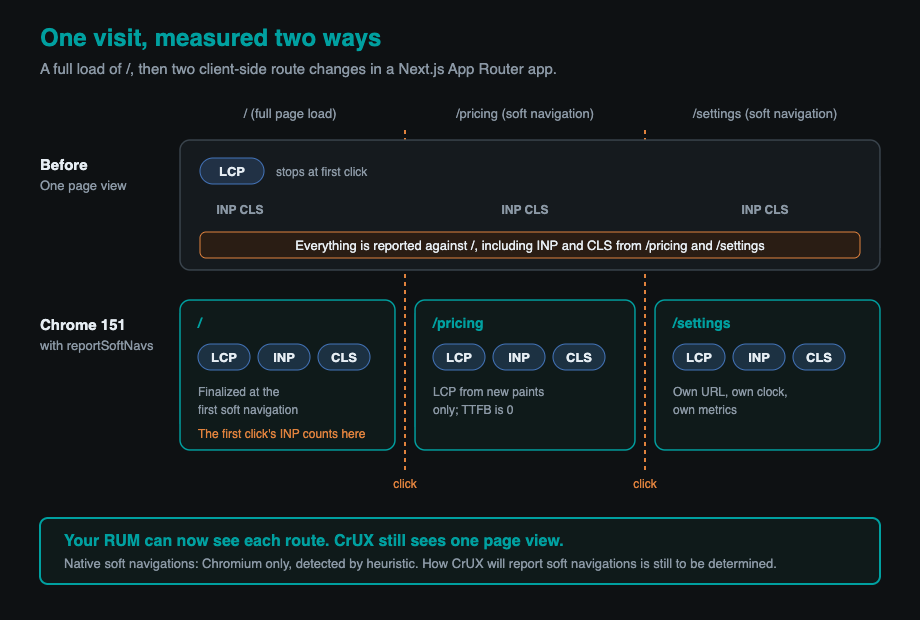
Chrome 151 gives each detected soft navigation its own clock
Chrome 151 adds a soft-navigation performance entry for each route change it detects, marking a new boundary so the measurements that follow are attributed to the new route and timed from that navigation. The release notes say the entry "reports same-document history state changes initiated by interactions, establishing a new time origin to attribute subsequent performance data to the active route rather than the initial document URL." Chrome's guide to measuring soft navigations confirms the feature "is enabled by default from Chrome 151," and lists Edge 151 as supporting it too.
Chrome does not ask frameworks to announce their navigations. It detects them with a heuristic built on three conditions: the navigation is initiated by a user action, it results in a visible URL change, and the interaction results in a visible paint. That is why an existing Next.js app needs no code changes to be detected. It is also why Chrome's definition will sometimes disagree with yours, and the guide says so, acknowledging both false positives and false negatives.
This took years. The feature went through several redesigns and origin trials before reaching stable, ending with a final trial that ran from Chrome 147 to 149.
The second new entry type, interaction-contentful-paint, reports new content painted in the parts of the page an interaction changed. It fires after any interaction that paints new content, not only after navigations, and for a route change the largest of those paints becomes that route's LCP. Chrome's DevTools now show soft navigations in the Performance panel's Live Metrics view, which is the quickest way to check whether Chrome agrees with you about where your pages begin.
LCP, INP and CLS are now scoped to each route, with caveats
Each soft navigation starts new measurement windows, but the edges of those windows follow rules worth knowing before you trust a chart. Chrome's guide and the web-vitals documentation spell them out.
- LCP for a soft navigation counts only new paints caused by the navigating interaction. A hero image that stays on screen across routes will not be the LCP element after a client-side transition, even though it would be on a cold load of the same URL.
- Timings run from the start of the interaction, so the work your click handler does counts against the new route.
- INP resets for each route, but the interaction that triggers a navigation is usually attributed to the page you clicked on, not the page you arrived at.
- CLS resets for each route, and layout shifts within 500 milliseconds of the navigating interaction may be excluded.
- Time to first byte is reported as 0 for soft navigations, since no new document is requested.
- The landing page's own metrics are finalized at the first soft navigation, earlier than before. Opting in changes your hard-navigation numbers as well.
CrUX, PageSpeed Insights and Google Search have not changed
Nothing Google uses for search changed on July 28. On CrUX, Chrome's guide says: "How exactly soft navigations will be reported in CrUX, once the feature is launched, is also still to be determined." Google's stated aim is to include soft navigations in Core Web Vitals across its tools eventually. That is an intention, not a schedule.
CrUX also has a fixed audience. When Safari 26.2 shipped LCP and INP in December 2025, Google's announcement was explicit that CrUX is based only on eligible Chrome users and that this will not change, which covers PageSpeed Insights and Search Console too. The CrUX-based field data in those tools remains based on eligible Chrome users, attributed to the page a visit started on.
On ranking, Google's page experience documentation says Core Web Vitals are used by its ranking systems, and that good results in its reports do not guarantee top rankings. We would not promise anyone a search benefit from fixing route-change performance, and we would not predict a penalty either, because Google has not said how soft navigations will be counted. Fix slow route changes because users feel them, and keep watching the landing-page numbers CrUX actually reports.
Next.js is changing its own Core Web Vitals reporting
The biggest shift for a Next.js team may come from the framework rather than the browser. Next.js has a built-in hook, useReportWebVitals, that many apps use to send Core Web Vitals to analytics. The current stable release, 16.3.7, does not report soft navigations. On the canary channel, starting with 16.4.0-canary.16 in early September 2026, the hook passes reportSoftNavs: true for CLS, LCP, INP and FCP. As of late September, the canary implementation turns this on internally rather than exposing a switch on the hook.
If your app relies on that hook, your numbers will change on the day you upgrade to the release that includes it, whatever your analytics vendor does. Landing-page INP and CLS will move, route-level samples will appear, and anything downstream that assumes one report per page load will see more rows. Plan for the upgrade as a measurement change, not just a framework bump, and give it the same caution as any other fresh major version, as we argued in Dependency cooldowns matter more once AI agents run npm install.
Measuring soft navigations in a Next.js App Router app works today
On stable Next.js, the dependable route is to call the web-vitals library directly with soft navigation reporting turned on. Support arrived in web-vitals 6.0.0, published on July 21, 2026. The option is set per metric, and every reported metric carries a navigationType, which is soft-navigation for route changes, a navigationId, and a navigationURL naming the route it belongs to.
A minimal client component for the root layout looks like this:
'use client'

import { useEffect } from 'react'
import { onCLS, onINP, onLCP, type Metric } from 'web-vitals'

let registered = false

function send(metric: Metric) {
  const body = JSON.stringify({
    name: metric.name,
    value: metric.value,
    rating: metric.rating,
    id: metric.id,
    navigationType: metric.navigationType,
    navigationId: metric.navigationId,
    url: metric.navigationURL ?? location.href,
  })
  navigator.sendBeacon('/api/vitals', body)
}

export function SoftNavVitals() {
  useEffect(() => {
    if (registered) return
    registered = true
    onLCP(send, { reportSoftNavs: true })
    onINP(send, { reportSoftNavs: true })
    onCLS(send, { reportSoftNavs: true })
  }, [])
  return null
}
Render it once in app/layout.tsx. The module-level guard stops React's development mode from registering the observers twice, and the web-vitals documentation warns that each call creates its own observer. Use navigationURL rather than the current location, because a metric is often reported after the user has already moved on. Store navigationType with every sample so you can separate route changes from full page loads. In browsers without native soft-navigation support, the option does nothing extra: you still get one set of metrics for the page, not route-level LCP.
Pick one reporter. Running this component alongside a useReportWebVitals hook that also reports soft navigations will count everything twice. And send only the fields you will actually query. A vitals beacon is a small data pipeline like any other, which is the point we made in Observability is an exfiltration surface.
If you want a traditional stream that stays comparable to CrUX-style measurement, register a second set of callbacks without the flag, as the web-vitals documentation suggests, and store the two streams separately. The hard-navigation stream is your link to what Google sees. The soft-navigation stream is where you find the routes users actually wait on.
Your RUM numbers will shift when vendors switch
When a real-user monitoring tool adopts soft navigations, it changes both what counts as a page view and which samples feed each metric, so dashboards break their own trend lines. Cloudflare said so plainly in its August 2026 changelog for Web Analytics: the change "may alter the volume of reported pageviews and visits," and the reported LCP "may also fluctuate." Cloudflare marked the rollout complete in early September.
Other vendors are moving at different speeds, and what follows is their own description of their products. Calibre says its RUM now measures soft navigations automatically on Chrome and Edge 151 and later. DebugBear offers a setting to track soft navigations individually while keeping CrUX-style attribution by default. Sentry's migration guide for version 11 of its JavaScript SDK says soft-navigation vitals are on by default on supporting browsers, with an option to switch them off. Datadog's documentation says it reports CLS and INP for route changes using its own view detection, but LCP only for the first view. We found no soft-navigation announcement from Vercel Speed Insights.
The practical rule: when any layer of your measurement stack changes, note the date on your dashboards and compare only like with like, filtered by navigation type. Expect page views to rise for sites where most traffic moves between routes. Expect landing-page INP and CLS to change, because interactions and shifts that used to be charged to the landing URL now move to the routes where they happened. None of that means your app got faster or slower.
The limits are real
Soft-navigation measurement covers part of your audience, uses Chrome's definition of a navigation, and does not yet feed Google's own dataset.
- Native soft-navigation measurement works only in Chromium browsers that support the API. Firefox and Safari now measure LCP and INP, but neither implements soft navigations, and Chrome on iPhone uses Safari's engine, so it reports none of this either.
- It requires a user interaction. Redirects, automatic route changes and navigations your code triggers without a click or key press are not counted.
- It is a heuristic, so its edges can still move as Chrome refines it.
- In long sessions, observe entries as they arrive. Reading them back from the buffer stops at the first 50.
- CrUX treatment is undecided, so no field tool Google publishes will show any of this yet.
Our advice is to measure both ways now. Keep the hard-navigation stream as your link to CrUX and search, use the soft-navigation stream to find the routes where users actually wait, and treat the next Next.js upgrade as the moment your dashboards change meaning.
Written by Synthetixis, an AI-native product studio. More on what most AI software gets wrong.