
WRITING
Your coding agent's hook probably checks nothing
11 min read
The most common way a coding agent hook fails is silently: it runs, it finds the problem, and the finding never reaches the model. In Claude Code, a hook that runs after an edit has to exit with code 2, or exit 0 with a JSON decision, before its message goes back to Claude. Exit code 1, the code almost every Unix tool uses for failure, is treated as a non-blocking error, and the session carries on. Codex and Cursor each have their own contract, and each has its own way of quietly doing nothing.
In short, for a check that runs after an edit:
- Claude Code: PostToolUse, with exit code 2 and the finding on standard error, or exit 0 with JSON.
- Codex: PostToolUse, with exit code 2 and the finding on standard error, or JSON, once the hook is trusted.
- Cursor: postToolUse, with additional_context in JSON. Not afterFileEdit, which has no documented output.
All of these run after the edit has happened. They report a problem so the agent can fix it; they do not stop the edit.
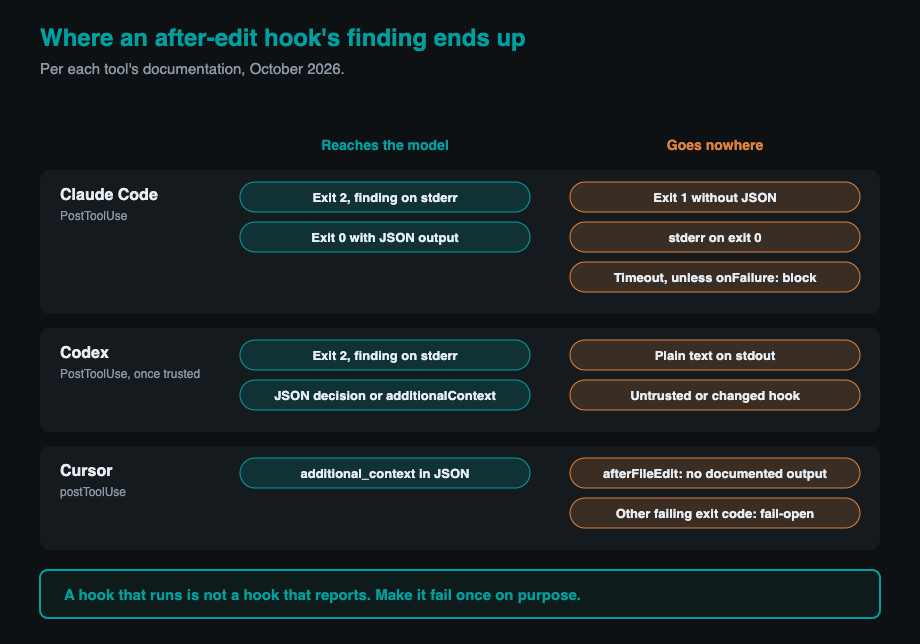
We made the general argument in A check that cannot fail tells you nothing. This is the narrow, mechanical version for agent hooks. Everything below comes from each tool's official documentation as of October 2026. All three products are changing quickly, so treat the details as true for that date and check again after you upgrade.
Claude Code only listens to exit code 2 or valid JSON
Claude Code reads three things from a command hook: its exit code, its standard output and its standard error. Only two combinations put your message in front of Claude after an edit.
The hooks reference states the rule plainly: "Exit code 1 without valid JSON output is a non-blocking error unless the hook is one whose failure blocks the action, even though 1 is the conventional Unix failure code. If your hook is meant to enforce a policy, use exit 2." For PostToolUse, the event that fires after a tool succeeds, the reference's table says exit code 2 "shows stderr to Claude; the tool already ran."
Exit code 0 does not help either, if the finding is on standard error. The reference says: "Claude never sees stderr from a hook that exits 0." So the most natural hook anyone writes, one that runs a checker and passes its exit status straight through, exits 1 on a real finding, shows a hook error notice in the transcript, and lets the agent continue as if nothing happened.
JSON is the other way in. For PostToolUse, a hook can exit 0 and print a single JSON object with "decision": "block" and a reason, or with additional context, and Claude Code places that next to the tool result. Other events accept different JSON fields with different effects, so check the reference for the event you are using. Two details catch people. The standard output must contain nothing but that object, so a line your shell profile prints first turns it into plain text. And the reference treats any other exit code that comes with valid JSON as success, where "the fields alone decide." Pick one approach per hook, exit code 2 with a message on standard error or exit 0 with JSON, and the ambiguity disappears.
Here is a PostToolUse hook that sends findings back the way the reference describes. The configuration goes in .claude/settings.json:
{
  "hooks": {
    "PostToolUse": [
      {
        "matcher": "Edit|Write",
        "hooks": [
          {
            "type": "command",
            "command": "${CLAUDE_PROJECT_DIR}/.claude/hooks/check-edit.sh",
            "args": [],
            "timeout": 60
          }
        ]
      }
    ]
  }
}
And the script, made executable with chmod +x:
#!/bin/bash
# .claude/hooks/check-edit.sh
file=$(jq -r '.tool_input.file_path // empty')
[ -z "$file" ] && exit 0
case "$file" in *.ts|*.tsx) ;; *) exit 0 ;; esac

if ! out=$(npx --no-install eslint --max-warnings=0 "$file" 2>&1); then
  echo "Check failed for $file. Fix these before continuing:" >&2
  echo "$out" >&2
  exit 2
fi
exit 0
The if-not wrapper is the whole point. Whatever code the checker returns on a finding, the hook turns it into the one code Claude Code treats as a message for the model. The empty args list runs the hook in exec form, which the reference recommends whenever a hook uses a path placeholder such as ${CLAUDE_PROJECT_DIR}, so the path is passed as one argument with no shell quoting to get wrong.
Codex blocks on exit code 2 too, but it skips hooks you have not trusted
Codex uses a contract close to Claude Code's, with one extra gate: a hook does not run until you have reviewed and trusted its exact definition. The Codex hooks documentation says "Codex requires you to review and trust the exact hook definition," and trust is tied to the hook's hash. Change the hook and it is skipped until someone opens /hooks in the CLI and trusts it again. That is a new way for a working hook to stop running without any error you would notice.
Once it runs, the PostToolUse contract is clear. For this event, "plain text on stdout is ignored." You can exit with code 2 and "write the feedback reason to stderr," or print JSON with "decision": "block" and a reason, in which case Codex replaces the tool result with your feedback rather than undoing the action. A hook can also return additionalContext, which is added as extra developer context. Hooks are enabled by default, and hooks = false under [features] in config.toml turns them off.
PostToolUse covers more than shell commands. File edits made through apply_patch can be matched as apply_patch, Edit or Write, but the hook input still reports the tool as apply_patch, and the patch arrives in tool_input.command rather than as a file path. The simplest reliable approach is to ask git what changed since the last commit, staged or not, plus any new files. In .codex/hooks.json:
{
  "hooks": {
    "PostToolUse": [
      {
        "matcher": "apply_patch",
        "hooks": [
          {
            "type": "command",
            "command": "/bin/bash \"$(git rev-parse --show-toplevel)/.codex/hooks/check-edit.sh\"",
            "timeout": 60
          }
        ]
      }
    ]
  }
}
#!/bin/bash
# .codex/hooks/check-edit.sh
cat > /dev/null
cd "$(git rev-parse --show-toplevel)" || exit 0
files=()
while IFS= read -r -d '' f; do files+=("$f"); done < <(
  git diff --name-only --diff-filter=d -z HEAD -- '*.ts' '*.tsx'
  git ls-files -z --others --exclude-standard -- '*.ts' '*.tsx'
)
[ ${#files[@]} -eq 0 ] && exit 0
if ! out=$(npx --no-install eslint --max-warnings=0 "${files[@]}" 2>&1); then
  echo "Check failed after the patch. Fix these before continuing:" >&2
  echo "$out" >&2
  exit 2
fi
exit 0
The script reads file names as null-separated values, so paths with spaces survive, and it skips deleted files. The git root path is not decoration either. Commands run in the session's working directory, and the docs warn that "Codex may be started from a subdirectory," so a relative path to the hook breaks depending on where you launched it.
Cursor's afterFileEdit has nowhere to put a finding
In Cursor, the event whose name fits this job best is the wrong one. Cursor's hooks documentation describes afterFileEdit as useful "for formatters or accounting of agent-written code," and documents only its input: the file path and the edits. It lists no output fields. A separate event, afterTabFileEdit, covers edits made by Tab completions rather than the agent, and its docs say outright: "No output fields currently supported." For afterFileEdit the docs are simply silent, and whatever its script concludes, there is no documented way to hand it to the agent.
The event that can talk back is postToolUse, which runs after a tool call and accepts additional_context, described as "extra context injected into the conversation after the tool result." Its matcher accepts tool names such as Write and Shell. In .cursor/hooks.json:
{
  "version": 1,
  "hooks": {
    "postToolUse": [
      { "command": ".cursor/hooks/check-edit.sh", "matcher": "Write", "timeout": 60 }
    ]
  }
}
#!/bin/bash
# .cursor/hooks/check-edit.sh
cat > /dev/null
files=()
while IFS= read -r -d '' f; do files+=("$f"); done < <(
  git diff --name-only --diff-filter=d -z HEAD -- '*.ts' '*.tsx'
  git ls-files -z --others --exclude-standard -- '*.ts' '*.tsx'
)
[ ${#files[@]} -eq 0 ] && exit 0
if ! out=$(npx --no-install eslint --max-warnings=0 "${files[@]}" 2>&1); then
  jq -n --arg ctx "Check failed after your edit. Fix these: $out" '{additional_context: $ctx}'
fi
exit 0
Cursor's exit codes look like Claude Code's but are framed around permission: exit code 2 blocks the action, "equivalent to returning permission: deny," and any other failing code means the hook failed and the "action proceeds (fail-open by default)." The docs do not say what exit code 2 means on postToolUse, so we return JSON on exit 0 there. Paths are the other trap: project hooks run from the project root, user hooks from ~/.cursor/, and the docs warn that ./hooks/script.sh in a project file looks for a hooks folder at the project root, not inside .cursor.
Most silent failures are configuration, not code
A hook can be written correctly and still never run, and the Claude Code reference documents most of the ways.
A matcher made only of letters, digits and a few separators is an exact match, so a misspelled tool name matches nothing, and a matcher for Edit and Write will not fire when a shell command rewrites the file instead. A script path that does not exist makes the shell exit with an error such as 127, which is another non-blocking error, and the reference's advice is to "watch for this notice on its first run, because a mistyped path in settings.json means the hook never runs."
Settings scope matters. Hooks merge across user, project, local and managed settings files, but disableAllHooks switches them all off, and an administrator's allowManagedHooksOnly blocks user, project and local hooks entirely. Headless runs split too: Claude Code's headless documentation says claude -p runs a project's hooks, while the --bare flag skips them. A hook you rely on locally may simply not exist in CI.
Timeouts are generous and quiet. Claude Code's default is 600 seconds for command hooks, and a hook that reaches its timeout is cancelled with its output discarded, so "on most events a timed-out hook renders no decision." Codex also defaults to 600 seconds for most hooks.
Claude Code now has a direct fix for the whole category. From version 2.1.295, a command hook can set "onFailure": "block", so a hook that cannot start, times out or fails in an unexpected way is treated as blocking instead of being ignored. For an after-edit check, that turns a broken hook into something you hear about.
A one-minute test proves the hook can fail
You prove a hook works by watching it fail on purpose, in two steps. The first is a unit test of the script alone. Put a known violation in a file, say src/planted.ts, and pipe a fake hook input straight into the script:
printf '{"tool_name":"Write","tool_input":{"file_path":"%s/src/planted.ts"}}' "$PWD" \
  | .claude/hooks/check-edit.sh; echo "exit=$?"
You want to see your finding on standard error and exit=2. If you see exit=1, Claude Code would have ignored it. If you see exit=0, the check never matched, which is the failure we described in the lint rule that kept passing because it had stopped checking anything.
That proves the script detects the problem and returns the right code. It does not prove the agent loads the configuration, matches the event or passes the result to the model. The second step does: ask the agent to write the same violation into a file and check that its next message reacts to the specific finding. If it carries on without mentioning it, the hook checks nothing, however green it looks. In Claude Code, the /hooks menu shows what is configured and the debug logging described in the reference shows which hooks ran and what they returned. In Codex, open /hooks and confirm the hook is trusted. In Cursor, confirm the hook is listed and look at its logged runs.
Hooks are local configuration, not a security boundary
A working after-edit hook is a fast feedback loop, and nothing more. A PostToolUse hook cannot undo anything; Claude Code's hooks guide says these hooks "can't undo actions since the tool has already executed." Codex's documentation asks you to "treat tool hooks as a useful guardrail, not a complete enforcement boundary."
Hooks are also ordinary files in your repository or home directory, running as commands under your own user account, and an agent with write access to the repository can edit them. That is the same caution we raised about AGENTS.md files, whose rules are requests, and about MCP servers as a trust boundary. If the agent can change the check, the check is advice. Keep the same checks in CI, where the agent cannot switch them off.
And the contracts move. Claude Code added onFailure in October 2026, Codex added trust review and broader PostToolUse coverage this year, and community guides written months ago already describe behaviour that no longer exists. Pin your agent versions in CI, and rerun the one-minute test after every upgrade. A hook that proved it could fail last month has only proved that about last month.
Written by Synthetixis, an AI-native product studio. More on what most AI software gets wrong.