
WRITING
Dependency cooldowns matter more once AI agents run npm install
14 min read
A dependency cooldown, a minimum age a published version must reach before your package manager will resolve it, is the first install-layer setting we would turn on in any project where an AI coding agent runs installs. The reason is timing. Several high-profile recent compromises of popular packages were live for hours, not days, and a one-day window filters them at resolution time, transitive dependencies included, for about one line of configuration.
That claim has limits, and a good part of this post is about them. The evidence that malicious versions are pulled quickly is strong for high-profile hijacks and thin in aggregate. The agent argument rests on how the tools are configured, not on any measurement of agents installing bad packages. And in several package managers the setting can be present and still do nothing.
A cooldown filters new versions at the moment the resolver picks them
A cooldown works at resolution time: when the package manager decides which version satisfies a range, it drops any candidate published more recently than the window. Everything else follows from that.
It applies to the whole dependency tree, not just the packages you name. pnpm's documentation says minimumReleaseAge applies to all dependencies, including transitive ones, and Bun's install docs say the same of its filter. That matters, because the attack that shows the mechanism best did not put its payload in the package anyone asked for.
It does not re-evaluate what is already locked. Bun's docs state that the filter affects new resolution only and that existing lockfile entries stay as they are. A cooldown primarily protects new dependency resolution, the moments when a new version can enter your lockfile, such as an add, an update or a resolve with no lockfile. It does not retroactively age a version you locked yesterday, which is why it complements a committed lockfile rather than replacing one.
The compromises that matter most were pulled within hours
The strongest case for a cooldown is a set of recent hijacks of widely used packages, each removed within hours of publication.
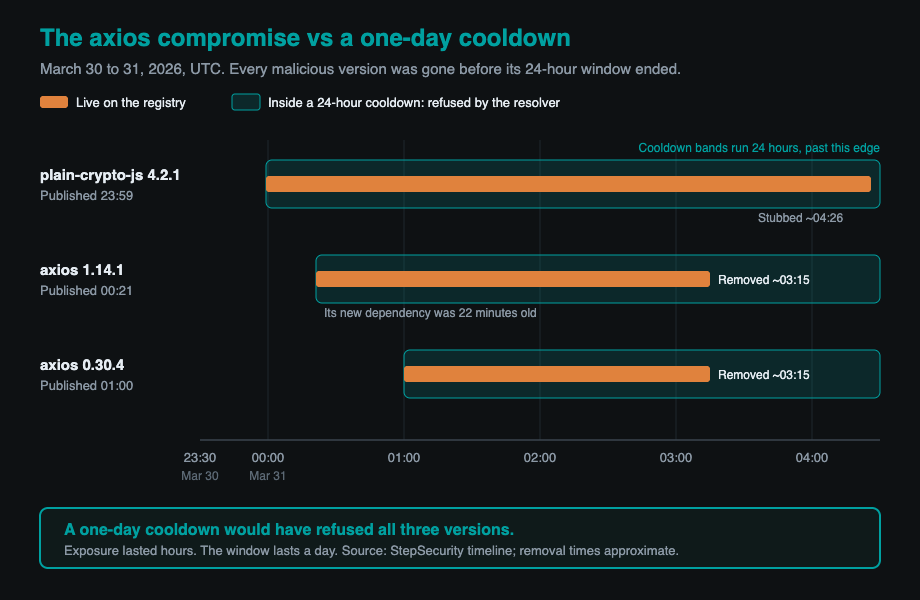
The axios compromise is the clearest. According to StepSecurity's timeline, an attacker published plain-crypto-js 4.2.1, carrying a malicious postinstall hook, at 23:59 UTC on March 30, 2026. Using a compromised maintainer account, they then published axios 1.14.1 at 00:21 UTC on March 31 and axios 0.30.4 at 01:00 UTC. Neither axios release contained malicious code of its own. Both added the new dependency, which was about 22 minutes old when the first poisoned axios shipped. StepSecurity puts npm's removal of both axios versions at about 03:15 UTC, a time it infers from registry metadata, and other responders' timelines differ by some minutes. Either way, the malicious versions were live for roughly three hours. A one-day cooldown would have refused both the new axios and the 22-minute-old dependency underneath it.
LiteLLM on PyPI followed the same shape. LiteLLM's incident post says versions 1.82.7 and 1.82.8 were live from 10:39 UTC on March 24, 2026 for about 40 minutes before PyPI quarantined them. The post lists who may have been affected, and one path stands out: pulling LiteLLM in as a transitive, unpinned dependency through AI agent frameworks, MCP servers, or LLM orchestration tools. The team believes the compromise originated in the Trivy scanner used in its CI security workflow. The Trivy advisory describes that earlier incident on March 19: a malicious Trivy release and force-pushed tags on its GitHub Actions. Those tags lived in Git, outside any package manager's reach, which is a useful reminder of where a cooldown stops.
William Woodruff's survey of ten prominent attacks reaches the same conclusion across a wider set: eight of ten had windows of opportunity under a week, and a 14-day cooldown would have blocked all but the xz-utils backdoor. His sample is small and hand-picked, and several entries are not registry packages, but the pattern matches the incidents above.
The aggregate evidence on detection speed is thinner than the advice suggests
"Malware is usually pulled within hours" is well supported for high-profile compromises and for PyPI's current report handling, and not established beyond that.
PyPI publishes the best numbers. Its 2025 year in review reports more than 2,000 malware reports, 66 percent handled within 4 hours and 92 percent within 24 hours. Those figures measure time from report to handling, not total time live, and they are self-reported. We found no comparable published statistic for npm from npm or GitHub. pnpm's settings page says that in most cases malicious releases are removed within an hour, without citing a source.
Older academic work measured something different and found long lifetimes. In a dataset of malicious npm, PyPI and RubyGems packages published between 2015 and 2019, Ohm and colleagues' Backstabber's Knife Collection found they stayed available for 209 days on average before being publicly reported, with a median of 67. Most of those were new names imitating real ones rather than hijacked releases of popular packages, and that distinction decides what a cooldown can do.
The agent argument rests on configuration, not measured behavior
The case that cooldowns matter more with agents is a mechanism argument, and we want to be clear that no study we found measured agents installing malicious packages.
The mechanism is simple. A person who runs an install often pauses: reads the package name, notices the version is from this morning, checks a changelog. An agent issuing the same command has no such pause unless someone built one in, and it can run many installs in a session. A cooldown lives in the package manager's configuration, so it applies whoever or whatever runs the command. That makes it one of the few install controls that does not depend on the agent's judgment or on a reviewer reading a transcript afterwards. It is also a better place for the rule than an instruction in a context file, which, as we found when we measured the cost of AGENTS.md files, an agent follows at its own discretion.
The closest measured datapoint is modest. In the study discussed in the next section, models emitted pip install or npm install commands without being asked in 7 percent of outputs. Whether an agent actually runs such a command, and whether it can reach the network when it does, depends on the tool's sandbox and approval settings, which vary by product and change often. Treat the agent risk as a property of your own configuration, and read the current defaults of the tool you use rather than trusting a summary. Every package an agent can reach is a trust decision, the same one we described for tools in MCP is a trust boundary you didn't know you crossed.
Hallucinated package names are a different problem that a cooldown only partly covers
Package hallucination, a model recommending a package that does not exist, is real and repeatable, and a cooldown addresses it only in one narrow case.
In a USENIX Security 2025 paper, Spracklen and colleagues generated 576,000 code samples across 16 models and found that 440,445 of 2.23 million recommended packages, 19.7 percent, did not exist, including 205,474 unique names. Commercial models hallucinated at 5.2 percent on average and open-source models at 21.7 percent. The finding that matters most for attackers is recurrence. When the authors re-ran 500 prompts that had produced a hallucination ten times each, 43 percent of the hallucinated names came back in all ten runs and 58 percent came back more than once. A repeatable fake name is a name worth registering.
A cooldown helps only when the attacker's registration is fresh. If someone registers a hallucinated name after noticing it, the first version is brand new, and a one-day window refuses it for that day. It does not help once the name has aged past the window, and it does nothing against names registered well in advance. For this threat the stronger control is checking that a dependency is the one you meant before it enters the manifest, and not letting an agent add new dependencies without review. Fewer dependencies is its own defense, which is part of the argument in Cheap code is a reason to build fewer things, not more.
Each package manager spells the same control differently
The same control has a different name and unit in every tool, and getting the unit wrong is the most common error in the guides that rank for it.
npm uses min-release-age, measured in days, off by default, added in npm CLI 11.10.0 in February 2026. Put min-release-age=1 in the project .npmrc. npm's config documentation settles several things older guides get wrong. The setting can coexist with before, and if both are set in the same source, before wins. When the window blocks a patched version that npm audit fix would install, npm keeps the vulnerable version, warns, and exits with a non-zero code. And min-release-age-exclude takes package names or glob patterns, exempting only the named package and not its dependencies. The docs add a warning worth heeding: excluding a package does not change which registry it comes from, so you should own your private scope on the public registry. npm 12, generally available since July 8, 2026, turned off dependency install scripts and Git and remote-URL dependencies by default, but it did not add a default release age.
pnpm uses minimumReleaseAge, measured in minutes, in pnpm-workspace.yaml. It has defaulted to 1440 since pnpm 11, with exceptions in minimumReleaseAgeExclude by name, pattern or exact version. Set it explicitly anyway, minimumReleaseAge: 1440, and set minimumReleaseAgeStrict: true next to it, for a reason covered below.
Yarn uses npmMinimalAgeGate in .yarnrc.yml. Yarn's security page gives its default as 1d, with exemptions in npmPreapprovedPackages and a per-command bypass with --no-time-gate on yarn add and yarn up.
Bun uses minimumReleaseAge under [install] in bunfig.toml, measured in seconds, so one day is minimumReleaseAge = 86400, with exemptions in minimumReleaseAgeExcludes. Bun's docs describe it as something you configure, so we treat it as off until set.
In Python, uv's exclude-newer accepts a duration such as "1 week" under [tool.uv], with per-package overrides in exclude-newer-package. pip added --uploaded-prior-to in 26.0 with absolute timestamps, and pip 26.1 added durations in days, such as --uploaded-prior-to P3D.
Update bots need a window at least as long as the package manager's
A bot that proposes updates the package manager will refuse only creates noise, so the two windows should agree.
Since July 14, 2026, Dependabot waits until a release has been available for at least three days before opening a version update, with no configuration needed, while security updates still open immediately. The window can be changed per ecosystem in dependabot.yml. Renovate's equivalent is its minimumReleaseAge option. Set the bot's window at or above the package manager's, or its pull requests will fail to install.
A bot's cooldown is not an install control. It decides when a pull request opens. The package manager decides what actually resolves, including when an agent runs an add directly.
A cooldown has limits worth planning for
A cooldown shortens exposure to one class of attack, and it has four limits.
It delays legitimate fixes. When a patched version ships for a live vulnerability, the window holds it back like any other release, and package-manager cooldowns cannot tell a security fix from an ordinary release. That is why npm makes a blocked audit fix fail loudly, and why every tool has an exclusion list. Keep a written exception process, and remove each exception once the fix has aged past the window.
It does not stop patient attacks. Woodruff's one miss, xz-utils, ran for about five weeks. An attacker who waits out the window, or registers a name well before using it, is not filtered. Critics such as Cal Paterson argue that cooldowns free-ride on early installers, who act as everyone else's unpaid testers, and that a single install outside the project's configuration bypasses the whole thing.
It can be present and do nothing, which is the limit we care about most, because it is a check that cannot fail. pnpm's built-in default is not strict: unless you set minimumReleaseAge yourself, pnpm falls back to a version younger than the window when nothing older satisfies the range. Setting it yourself is meant to switch strict mode on, and pnpm's 12.2 and 12.3 release notes restate that rule "wherever it was set" after an early pnpm 12 regression was reported against it, which is exactly why we set the strict flag explicitly rather than rely on the implied default. pnpm and Bun also skip the check for versions whose registry metadata lacks a publish time, which some private registries and mirrors omit. uv takes the opposite approach and treats such versions as unavailable. And an npm client older than 11.10.0 does not know the setting exists. Pin the package manager version, set the value explicitly, and test it by trying to add a version published today. If that install succeeds, the cooldown is not doing what the config file says.
It is not a substitute for the rest. A lockfile, provenance and trusted publishing, and install-script controls each close a different gap. The poisoned axios releases broke the project's usual trusted-publishing pattern, and npm 12's default of not running dependency install scripts would have kept the postinstall payload from executing. The cooldown is the easiest of the set to add.
Our own configuration
We use pnpm, pinned to version 12.6.0 through the packageManager field. The project is split into more than one pnpm workspace, and each workspace has its own settings file. That detail matters more than it looks, because pnpm reads the settings of the workspace you install in, so a cooldown set in one file does nothing for the others. We set minimumReleaseAge: 1440 explicitly in every one of them in late September 2026. We have not added minimumReleaseAgeStrict: true beside it. The test below shows that in pnpm 12.6.0 the explicit value alone turns strict mode on, but the advice above still stands: setting the flag as well protects you from a future change to that default.
We chose one day because the compromises above were removed within hours, and a longer window would hold back security fixes for longer. We have no exclusions from the window today, and the cooldown has not yet held back a security fix, so we have no worked example of that case. When it happens, pnpm's own error message lists the ways out: approve the pick interactively, add the package to minimumReleaseAgeExclude, or wait for it to mature.
The same files turn on pnpm's trustPolicy: no-downgrade, which fails an install when a package's trust level has dropped compared with its earlier releases, such as a version published without the provenance attestation its predecessors carried. It has been the busier of the two controls. It flagged three dependencies in our tree, and in each case we pinned the last attested version instead of switching the policy off, with a comment beside each pin giving the reason. One case had no clean answer: the flagged release was itself a security fix, and the attested version before it was vulnerable. We moved that dependency to a newer major line that carries provenance, after checking that the functions our tooling calls are unchanged and the lint tests still pass. That is what an exception policy looks like in practice, a written reason next to every exception rather than a rule turned off.
The cooldown has not blocked anything in normal use that we know of, and we have not had a supply-chain incident. So we tested it. On September 29, 2026 we reproduced the release-age setting in a clean project on pnpm 12.6.0 and tried to add a TypeScript nightly build published about eight hours earlier. We ran it three ways:
- With
minimumReleaseAge: 1440set explicitly, pnpm refused withERR_PNPM_NO_MATURE_MATCHING_VERSION, listed each package that was younger than the cutoff with its publish time, and exited with a non-zero code. Nothing was installed. - With no setting at all, relying on pnpm's built-in one-day default, the eight-hour-old version installed without a warning.
- With the value set but
minimumReleaseAgeStrict: false, it also installed.
The second result is the one worth remembering. The default is on, and it is a one-day default, and it still let a version through that was a third of a day old, because nothing older satisfied the exact version we asked for and the built-in default is not strict. That is the whole case for setting the value yourself and then checking it by watching it refuse something.
The rule we follow
Set a cooldown of at least a day in every package manager you use, set it explicitly even where a default exists, give your update bot the same window or longer, keep a written exception path for security fixes, and prove the setting works by watching it refuse something. A cooldown is the layer that still holds when nobody reads the install command, and with agents in the loop that is increasingly the ordinary case.
Written by Synthetixis, an AI-native product studio. More on what most AI software gets wrong.