
WRITING
A pageview in a single-page app is whatever your analytics tool decides it is
11 min read
In a single-page app, a pageview is not something the browser records. It is a rule each analytics tool writes for itself, and the rules differ. GA4 counts some URL changes that PostHog ignores. Vercel watches the pathname. Cloudflare now uses Chrome's soft-navigation detection where the browser supports it, and falls back to other methods everywhere else. Put two of these tools on the same Next.js App Router app and they will report different pageview counts, both correctly, because they are counting different things.
That has two practical consequences. Pageview numbers from different tools are not comparable. And numbers from the same tool are not comparable across a configuration change or SDK upgrade, several of which shipped in 2026 without anyone changing a line of application code.
The browser has no pageview event in a single-page app
A full page load is easy to count: the browser requests a document and the analytics script runs. A client-side route change has no equivalent moment. The Next.js documentation describes client-side transitions as updating the content dynamically "instead of reloading the page." What changes is the URL, through the History API, and what is on screen.
Next.js does not emit a pageview event of its own. Its useRouter documentation suggests listening for page changes by composing usePathname and useSearchParams. Its analytics guide covers performance reporting through useReportWebVitals, which is Core Web Vitals data, not page views. So every analytics tool has to decide which signal stands in for "a page was viewed": a History API call, a change in some part of the URL, a React effect, or a browser heuristic. Each one decided differently.
Each analytics tool picks a different trigger
The tools below are all well documented, and their documentation and source code describe noticeably different rules. In short:
- GA4: browser history changes, including replaceState.
- PostHog: pathname changes in its history_change mode.
- Vercel: pathname changes, detected in React.
- Plausible: pushState, with hash routes as an option.
- Umami: pushState, replaceState and hash changes by default.
- Fathom: route changes only when you turn on its single-page app mode.
- Cloudflare: Chrome's soft-navigation detection where available, with fallbacks elsewhere.
The detail follows. Everything here is the vendors' own description of their products, or what their published source code does, and we say which.
GA4 counts history changes, including replaceState. Its single-page application guide recommends turning on enhanced measurement so page views are tracked "based on browser history events." Google's enhanced measurement help page says the page_view event fires "each time the page loads or the browser history state is changed by the active site," and that this option "listens for pushState, popState, and replaceState."
PostHog counts pathname changes when history capture is on. Its JavaScript configuration docs say the special value history_change makes PostHog "capture pageviews based on path changes," and that history_change becomes the default once you set the dated defaults option to "2025-05-24" or later. The SDK source patches both pushState and replaceState, but in history_change mode it compares only the pathname, so a change to the query string alone is not a pageview. PostHog's Next.js guide relies on this through a defaults value rather than a manual component.
Vercel Web Analytics counts pathname changes through React. Its documentation says the first load is tracked as a page view and "subsequent page views are tracked through the native browser API." In the published source of its Next.js component, the page view is sent from a React effect that runs when the route or the pathname from usePathname changes, and the path it records excludes the query string.
Plausible counts pushState. Its script documentation says the script "attaches listeners to the History API and will automatically trigger pageviews when you use history.pushState." Hash-based routes are only tracked if you turn on hashBasedRouting.
Umami counts pushState, replaceState and hash changes. Its single-page app guide says the tracker monitors "pushState and replaceState" and the popstate event, and that hash routes are tracked by default.
Fathom counts route changes only if you ask it to. Its advanced script docs describe single-page app tracking as a setting, data-spa, with auto, history and hash modes. Without it, Fathom collects a page view each time a page loads with the script on it.
Cloudflare Web Analytics now depends on the visitor's browser. Its single-page app documentation lists three methods in order: the Soft Navigations API, then navigate events from the Navigation API, then a fallback that patches pushState and listens to popstate. So in Chrome and Edge 151 and later, Cloudflare can rely on Chrome's soft-navigation detection, while in Safari and Firefox it falls back to the Navigation API or the History API. The same visit can be counted by different methods depending on the visitor's browser.
The same route change gets counted differently by each tool
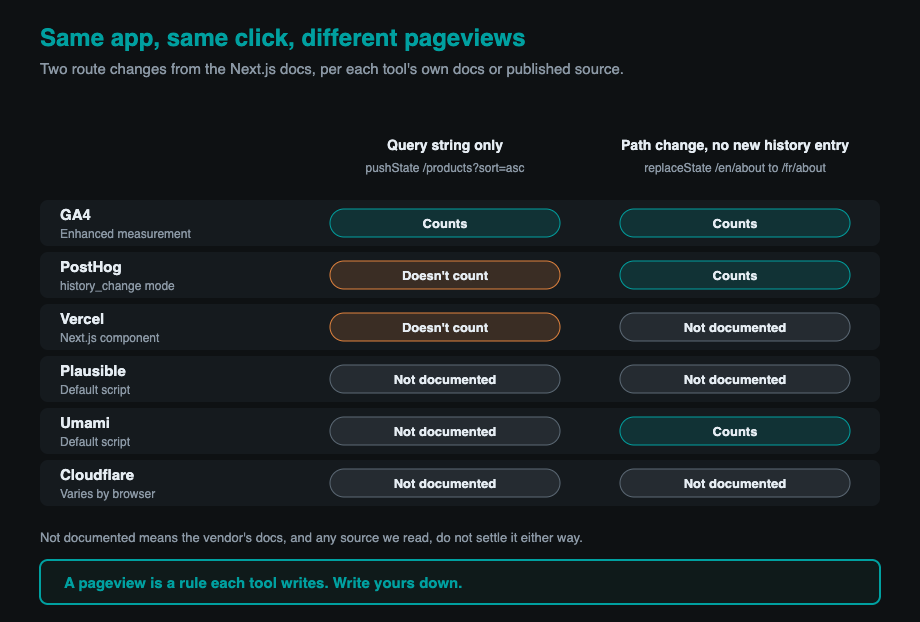
The differences stop being abstract when you run the examples from the Next.js docs themselves. The Next.js documentation shows two common patterns: pushing a query string such as ?sort=asc to sort a product list, and using replaceState to switch locale from one path to another without adding a history entry.
Sorting with ?sort=asc keeps the same pathname and changes only the query string. GA4 counts it as a page view, because the history state changed. PostHog in history_change mode does not, because the pathname did not change. Vercel does not, because the path it records is the pathname. Plausible and Umami hook pushState, but their docs do not say whether they skip a call where only the query changes, so we would not predict their behaviour without testing.
Switching locale with replaceState changes the pathname without a new history entry. GA4 counts it, because it listens for replaceState. PostHog counts it, because it patches replaceState and the pathname changed. Umami counts it. Plausible and Cloudflare's fallback only document pushState, so their behaviour here is not stated in their docs.
Our point is not that any of these tools is wrong. Each one does exactly what it documents. The point is that "pageviews" in two dashboards can describe two different sets of events, even when both tools are working perfectly.
Hash routes, query strings and back and forward are opt-in in one tool and default in another
The edges of the definition move from tool to tool as well. Hash changes count by default in Umami, only with an option in Plausible, only with a mode in Fathom, and only through a newer configuration form in PostHog. Query-string changes count in GA4 but not in PostHog's history_change mode or in Vercel's Next.js component. Back and forward navigation fires the popstate event, which GA4, PostHog, Umami and Cloudflare's fallback all listen for, and Cloudflare additionally reports back-forward and back/forward cache restores as their own navigation types.
The rule that decides the most is often invisible in the dashboard: which parts of the URL count as a new page. A product list with filters in the query string can look like one page in one tool and fifty in another.
Your pageview definition can change even if your code does not
Several of these definitions changed in 2026, through vendor releases rather than application changes.
PostHog's definition depends on a dated setting. Its configuration page lists a series of defaults dates through 2026, each of which "enables new default behaviors that were introduced on that date." In version 1.418.13 of the JavaScript SDK, released on August 24, 2026, the changelog says capture_pageview "now accepts an object with path, search, and hash options," with each selected part of the URL triggering a pageview when it changes. Even the word default needs care here. PostHog's configuration page says capture_pageview captures page loads unless you pass a defaults date of 2025-05-24 or later, in which case history_change applies, and its current Next.js guide passes such a date. Its autocapture page simply lists history_change as the default, without that condition. Both are true in context, which is the point: what PostHog counts depends on a date in your configuration, so the safest assumption is that your setting is whatever you explicitly wrote down.
Cloudflare changed its definition for everyone. In its August 21, 2026 changelog, it said the move to soft-navigation measurement "may alter the volume of reported pageviews and visits in the dashboard and GraphQL API," and it marked the rollout complete on September 4. Before that, Cloudflare used the History API alone.
And the browser itself gained a heuristic for detecting route changes. Chrome 151, stable since July 28, 2026, detects soft navigations on its own, which Cloudflare now uses where it can. We covered that change from the performance side in Core Web Vitals finally see past the first page of a single-page app.
Chrome's soft navigation is a performance heuristic, not a pageview standard
It is tempting to treat Chrome's new soft navigation as the long-awaited standard definition of a page view in a single-page app. It is not, and Chrome does not present it as one.
Chrome's soft navigation guide defines a soft navigation by three conditions: it is initiated by a user action, it results in a visible URL change, and the interaction results in a visible paint. The purpose is to give performance metrics such as LCP and INP a fresh start for each route. It works only in Chromium browsers, and the guide acknowledges the heuristic produces false positives and false negatives.
That definition differs from history-based counting in ways that matter. By Chrome's rules, a URL change with no user interaction, such as a redirect your code performs when a component mounts, is not a soft navigation. The History API patches used by GA4, PostHog and Umami do not document any interaction requirement, so from their definitions they would count it if the part of the URL they watch changed. That is our reading of the documented rules rather than a measured result, and it is exactly the kind of difference that makes two tools disagree.
Running two counters at once double-counts by design
Many apps end up with two pageview mechanisms without anyone deciding it. Google's single-page application guide warns about the most common case directly: "If you configure your tags using Google Tag Manager, don't enable automatic history tracking in Google Analytics, as this can lead to double-counting page views." The same pattern applies anywhere automatic history tracking meets a hand-written route listener.
PostHog currently documents two ways to track Next.js pageviews: automatic history capture through the defaults setting in posthog-js, and a PostHogPageView React component in its pre-release @posthog/next package. The docs do not say how the two interact, so if you adopt the component, check that you are not also capturing through history_change.
Hand-written trackers have a development-only trap too. React's Strict Mode runs an extra setup and cleanup cycle for every effect in development, and Next.js turns Strict Mode on by default for the App Router. A pageview sent from a plain useEffect can fire twice on your laptop and once in production. That will not distort production numbers, but it can convince you during testing that a working tracker is broken, or that a broken one is fine.
Pin the definition and note the day it changes
You cannot make pageview counts from different tools agree, but you can make your own numbers mean something consistent. We would do four things.
Write down the rule. For each tool, record in your repository which events produce a pageview: which History API calls, which parts of the URL, whether hash changes count. If you cannot say what a pageview means in your app, nobody reading the dashboard can either.
Make the setting explicit. Set PostHog's defaults date or capture_pageview value, GA4's history-change setting, and Plausible or Fathom's single-page app options deliberately, rather than relying on whatever the current default is, and pin the SDK version so an upgrade is a decision rather than a surprise.
Record how each page view happened where the tool allows it. PostHog sends a navigation_type property with history-captured pageviews, and Cloudflare reports navigation types you can filter by. Storing the trigger lets you separate a real route change from a query-string update after the fact.
Annotate the dashboard on the day any of this changes: an SDK upgrade, a defaults date, a vendor rollout like Cloudflare's. A jump in pageviews on the day the definition changed is a measurement event, not a traffic event.
And test it the way you would test any other check. Assert in an end-to-end test that clicking through a route produces exactly the pageviews you expect, and that a filter change produces the number you have decided on. A pageview tracker that has never been shown to fire, or never been shown not to fire, is a check that cannot fail.
This post is about how pageviews are counted, not about what analytics collects. That second question, and why the defaults usually collect more than you meant, is the subject of Observability is an exfiltration surface.
Pageviews are a definition you choose
In a server-rendered site, a pageview was close to a fact: one document, one view. In a single-page app it is a choice about which URL changes count, made by your analytics vendor unless you make it yourself. Choose it on purpose, write it down, and read every pageview chart with that rule in mind.
Written by Synthetixis, an AI-native product studio. More on what most AI software gets wrong.