
WRITING
Progressive web apps on iPhone in 2026: what is true and what is folklore
11 min read
Progressive web apps work on iOS, and they are more capable than the most widely circulated claims about them suggest. Push notifications have worked since 2023. The widely cited 50MB cache limit is not a real policy. The seven-day storage eviction rule never applied to installed web apps at all.
What remains true is narrower and more specific: no Background Sync, no Web Bluetooth, NFC, or USB, no automatic install prompt, and an install path that runs entirely through a manual Safari gesture. That last one is not a capability problem. It is a conversion problem, and it is the one worth planning around.
Every capability claim below links to WebKit's own documentation, because secondary coverage in this category is where the errors come from.
What works, each with the condition that actually applies:
- Push notifications, but only after the user adds the site to the home screen.
- App badges, under the same install requirement.
- Offline storage, with quota calculated as a share of available disk rather than a fixed cap.
- Standalone display, which has been the default for any home screen site since iOS 26.
- Persistent storage, granted on heuristics that favor home screen web apps.
What is not available:
- Background Sync. No WebKit implementation.
- Web Bluetooth, Web NFC, and WebUSB. Declined by Apple in 2020.
- Automatic install prompts. No beforeinstallprompt equivalent exists in Safari.
- App Store listing. A PWA is not an App Store package.
We wrote about when a mobile app is actually worth building and treated the iOS capability ceiling as a given. This is the version with the receipts.
Progressive web apps are not dead, and the content saying otherwise is frozen in February 2024
The "Apple killed PWAs" genre has a specific and traceable origin. In the second beta of iOS 17.4, Apple removed home screen web apps for EU users and cited DMA compliance. For roughly two weeks the developer web produced a wave of obituaries.
Then, on March 1, 2024, Apple reversed. It stated it had received requests to continue support and would keep the existing home screen web apps capability in the EU. iOS 17.4 shipped that month with the functionality intact.
The obituaries were never updated. They still rank. If you search whether PWAs are dead or still relevant in 2026, most of what comes back describes a two-week beta state from two and a half years ago as though it were the present.
This is not a historical curiosity. At the time of writing, a currently ranking 2026 guide states that PWAs in EU countries open in Safari tabs with no push support. That is false, and it has been false since before iOS 17.4 shipped.
Push notifications have worked since March 2023
Home screen web apps on iOS have been able to send push notifications since iOS 16.4, which shipped in March 2023, as WebKit announced at the time. This is the single most repeated false claim about PWAs, and it has been false for three and a half years.
Declarative Web Push went further, arriving for home screen web apps on iOS and iPadOS 18.4 and reaching macOS with Safari 18.5. It removes the service worker requirement for the straightforward case, which WebKit justified in terms of developer complexity, battery and CPU cost, and misuse surface. The Badge API works, so you can put a count on the icon.
One constraint that does apply and rarely gets mentioned: WebKit does not allow silent push. Push subscriptions must set userVisibleOnly to true, so every message you send has to display a notification. If your design assumed background data delivery dressed up as push, it does not work here.
The bigger constraint is different from the one people state. Push only works once the user has added the site to the home screen. There is no automatic prompt for that step, which means every notification you ever send depends on a manual gesture the user performs inside Safari's share sheet. The capability is not the bottleneck. The funnel is.
The 50MB cache limit is not a real policy
There is no 50MB cache cap on iOS. Since Safari 17, quotas are calculated from available disk space rather than a fixed per-site limit. WebKit's storage policy sets two separate limits for a browser app: an origin quota of up to 60 percent of total disk space, and an overall quota across all origins of up to 80 percent. A standalone home screen web app gets the same origin and overall quota as it would in the browser. Safari 17 also stopped prompting users when a site wanted more space.
The 50MB number appears to be a survival of a much older WebKit behavior that gets copied forward from post to post. It was still being published in 2025, well after the policy it describes stopped applying. If you have made an architecture decision based on it, that decision was made against a constraint that does not exist.
Two things the quota does not cover. Cookies and the HTTP cache sit outside this policy entirely and are not bounded by quota. And quota is an upper limit rather than a guarantee, so QuotaExceededError handling is still required. WebKit also notes that the reported quota can vary with existing usage and visit frequency to reduce fingerprinting, which means a value you measured once is not a value you can rely on.
Persistent storage is the answer to eviction, and almost nobody mentions it
Eviction is real. WebKit deletes data on an origin basis using a least recently used policy when the overall quota is exceeded or the device is under storage pressure. By default every origin sits in best-effort mode, where persistence is not guaranteed.
But an origin can request persistent mode through StorageManager.persist(), and WebKit grants that request on heuristics that explicitly include whether the site is running as a home screen web app. An origin in persistent mode is excluded from eviction.
So the correct answer to "will iOS delete my offline data" is not a flat yes or no. It is that you should be requesting persistence, checking the result, and designing for the case where it is refused. That is a different engineering task from the one implied by every article that just warns about eviction and stops.
The seven-day eviction rule does not apply to installed web apps
Intelligent Tracking Prevention deletes script-writable storage for an origin after seven days of Safari use without user interaction. That is true, and it is why the rule gets cited. What gets left out is Apple's own clarification, published when the policy shipped: web applications added to the home screen are not part of Safari and have their own counter of days of use, which resets on actual use of the application.
So an installed web app that someone opens regularly does not lose its data on a seven-day timer. A site the user only visits in a Safari tab does.
There is a related trap worth flagging with a caveat about its source. Independent testing by Maximiliano Firtman when iOS 14 shipped found that service worker registration and CacheStorage are shared between Safari and the installed web app, while cookies, Web Storage, and IndexedDB stay isolated. Apple has never documented this split, Firtman observed inconsistent session behavior in his own testing, and we have not re-verified it on iOS 26.
Treat it as a thing to test rather than a thing to rely on, and test it in the direction that matters: if a user signs in through Safari and then installs to the home screen, do they arrive signed in or signed out? If your install prompt fires after authentication and the answer is signed out, you have built a flow that silently discards the state the user just created. That is the kind of failure that produces no error and no complaint, just a quiet drop in the funnel. It is the same shape as the problems we have written about before, where the configuration is wrong but everything still runs.
iOS 26 made every home screen site open as a web app, whether you designed for it or not
As of iOS 26 and iPadOS 26, WebKit removed the requirements for installability entirely. Any website added to the home screen now opens as a web app by default, with or without a manifest. The stated reasoning was consistency with macOS, where sites added to the Dock have always behaved this way.
The distinction worth holding onto is that this is about home screen behavior, not about a site meeting the traditional PWA installability criteria. Nothing was added to the platform. The standalone experience simply became the default for sites that never opted into it.
For seventeen years that opt-in was required, through the apple-mobile-web-app-capable meta tag introduced in 2008 or a manifest display value, which Safari supported from iOS 11.4 in March 2018. Users can now disable the behavior per site through an Open as Web App toggle, so it is a default rather than a mandate.
This is being reported as a win, and for genuine PWAs it is. For everyone else it is a new class of untested surface. Your site can now run without browser chrome for a user you never designed that experience for. Things that quietly depended on chrome existing are now exposed: navigation with no back button, OAuth flows that redirect out to Safari and lose the session on return, external links that open in a separate browser context, and any state recovery that assumed a reload was one tap away.
Nobody shipped a change to make this happen. The platform changed underneath sites that were never opted in. That is worth checking on your own properties even if a PWA was never part of your plan.
We repeated one of these errors ourselves
We are in a position to be specific about how contagious this is, because we published a version of it.
An earlier post on this site said that Apple's DMA response degraded home screen web app behavior in the EU. That sentence described a two-week beta state as a current condition. We have corrected it. We caught it while verifying claims for this post, which is the only reason we caught it at all.
That is the actual lesson of this category. A capability claim about iOS without a date attached is not information, and a verification step that only confirms what you already believed will return a pass whether the claim is right or the check is blind.
What still does not work
Four gaps remain, and they are the ones that should drive an architecture decision.
Background Sync is not implemented. If work has to reach your server before the user next opens the app, that is not achievable on iOS.
Web Bluetooth, Web NFC, and WebUSB are absent, and not by accident. In June 2020 Apple declined to implement sixteen web APIs on fingerprinting and privacy grounds, including these three plus Web Serial, Web MIDI, Battery Status, and several sensor APIs. That position has not changed. For direct access to a reader, beacon, wearable, or terminal from iOS, you need a native integration rather than a standard web API.
Automatic install prompts do not exist. There is no beforeinstallprompt equivalent in Safari. Installation is a manual gesture inside the share sheet, which you can instruct but cannot trigger.
App Store distribution is a separate question from PWA capability. A PWA is not an App Store package, so it gets no store discovery. A wrapped web experience is a distinct native submission and has to satisfy Apple's review requirements, including sufficient native functionality.
Everything else on the usual list is worth checking against a primary source before you treat it as a constraint.
The install funnel is the part to plan around
The binding constraint on iOS is not what a web app can do once installed. It is how many people install it.
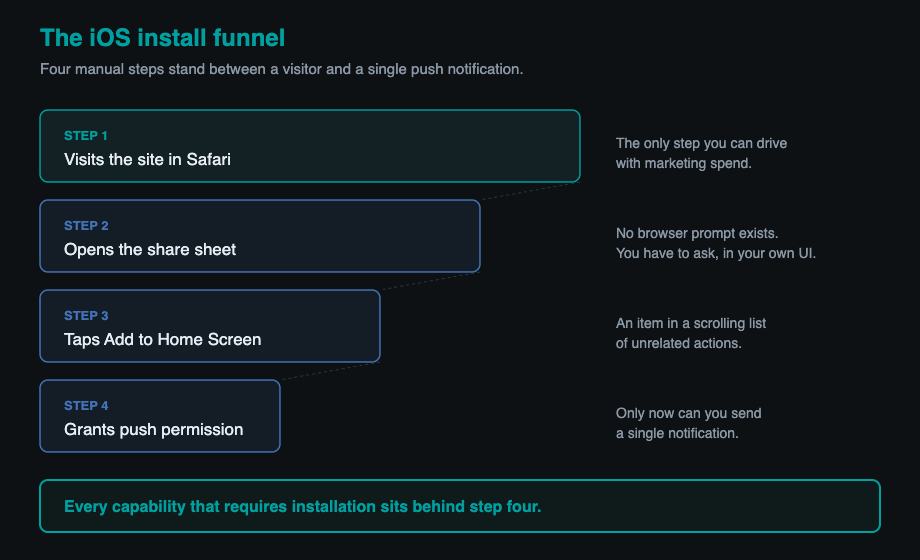
Every capability that matters, push included, sits behind a gesture with no prompt, no browser-driven affordance, and no store listing pointing at it. You are asking users to open a share sheet and find an item in a list. If your retention model depends on notifications, model the install rate first, because the capability is worthless at a conversion rate you have not measured.
This is why we treat a PWA as a strong default for portals, internal tools, booking flows, and first versions, and a weak default for consumer products whose entire engagement loop depends on notifications reaching people who have not installed anything.
How to check any of this yourself
Go to the source rather than the summary. WebKit publishes per-release feature notes for every Safari version, a feature status page tracking what is implemented or in development, and its tracking prevention documentation covering ITP behavior. Apple's Safari release notes carry the same information in a different shape. Between them you can date any capability claim in this article in a few minutes.
That habit is the whole point. This category is unusually full of confident statements that were true once, were never true, or stopped being true in 2023, and they rank well because nobody rechecks them. Including, on one occasion, us.
Written by Synthetixis, an AI-native product studio. More on what most AI software gets wrong.